
The GOTO statement allows you to transfer control to a labeled block or statement. The following illustrates the syntax of the GOTO statement:
GOTO label_name;Code language: SQL (Structured Query Language) (sql)The label_name is the name of a label that identifies the target statement. In the program, you surround the label name with double enclosing angle brackets as shown below:
<<label_name>>;Code language: SQL (Structured Query Language) (sql)When PL/SQL encounters a GOTO statement, it transfers control to the first executable statement after the label.
PL/SQL GOTO statement example
The following shows an example of using the GOTO statements.
BEGIN
  GOTO second_message;

  <<first_message>>
  DBMS_OUTPUT.PUT_LINE( 'Hello' );
  GOTO the_end;

  <<second_message>>
  DBMS_OUTPUT.PUT_LINE( 'PL/SQL GOTO Demo' );
  GOTO first_message;

  <<the_end>>
  DBMS_OUTPUT.PUT_LINE( 'and good bye...' );

END;
Code language: SQL (Structured Query Language) (sql)
The output is:
PL/SQL GOTO Demo
Hello
and good Bye...
Code language: SQL (Structured Query Language) (sql)
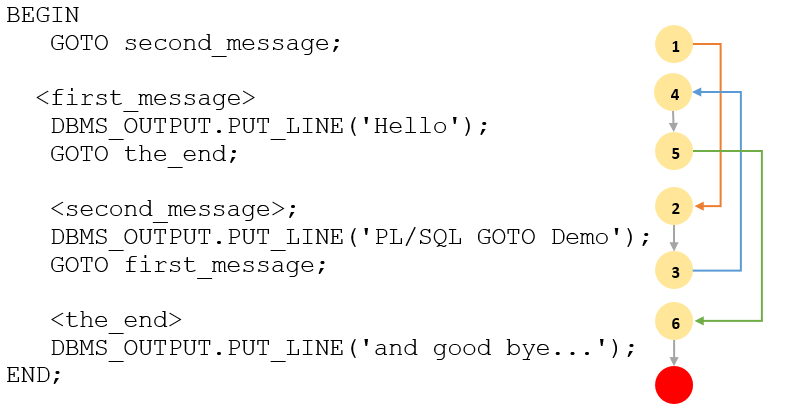
The following explains the sequence of the block in detail:
- First, the
GOTO second_messagestatement is encountered, therefore, the control is passed to the statement after thesecond_messagelabel. - Second, the
GOTO first_messageis encountered, so the control is transferred to the statement after thefirst_messagelabel. - Third, the
GOTO the_endis reached, the control is passed to the statement after thethe_endlabel.
The picture below illustrates the sequence:
GOTO statement restrictions
The GOTO statement is subject to the following restrictions.
First, you cannot use a GOTO statement to transfer control into an IF, CASE or LOOP statement, the same for the sub-block.
The following example attempts to transfer control into an IF statement using a GOTO statement:
DECLARE
  n_sales NUMBER;
  n_tax NUMBER;
BEGIN
    GOTO inside_if_statement;
    IF n_sales > 0 THEN
      <<inside_if_statement>>
      n_tax  := n_sales * 0.1;
    END IF;
END;
Code language: SQL (Structured Query Language) (sql)
Oracle issued the following error:
PLS-00375: illegal GOTO statement; this GOTO cannot branch to label 'INSIDE_IF_STATEMENT'
Code language: SQL (Structured Query Language) (sql)
Second, you cannot use a GOTO statement to transfer control from one clause to another in the IF statement e.g., from IF clause to ELSIF or ELSE clause, or from one WHEN clause to another in the CASE statement.
The following example attempts to transfer control to a clause in the IF statement:
DECLARE
  n_sales      NUMBER;
  n_commission NUMBER;
BEGIN
  n_sales := 120000;
  IF n_sales      > 100000 THEN
    n_commission := 0.2;
    GOTO zero_commission;
  elsif n_sales   > 50000 THEN
    n_commission := 0.15;
  elsif n_sales   > 20000 THEN
    n_commission := 0.1;
  ELSE
    <<zero_commission>>
    n_commission := 0;
  END IF;
END;
Code language: SQL (Structured Query Language) (sql)
Oracle issued the following error.
PLS-00375: illegal GOTO statement; this GOTO cannot branch to label 'ZERO_COMMISSION'
Code language: SQL (Structured Query Language) (sql)
Third, you cannot use a GOTO statement to transfer control out of a subprogram or into an exception handler.
Fourth, you cannot use a GOTO statement to transfer control from an exception handler back into the current block.